
AIRWARE
The sky’s the limit when it comes to selecting flight simulation hardware for your PC.
Bernard Dy has been reviewing software for Aviation History for more than a year. We have welcomed his straightforward evaluations and his practical comments on the whole range of CD-ROM, Internet and diskette versions of the latest software offerings. Beginning with this issue, Bernie will have a regular column with more of the same. If you come across aviation-related software that has not been reviewed, drop Bernie an e-mail by visiting www.thehistorynet.com.
Simulation on the personal computer isn’t just about software; it’s about hardware, too. A good peripheral can help approximate the pilot’s physical input more intuitively than a keyboard. Contemporary programs almost require an input aid, given their complexity. If you’ve ever tried to play a simulation with a keyboard, you know how hard it is to fly with any precision. The keyboard is a tremendous tool for translating words to print, but poor at transmitting the concept of motion to a simulator.
The Basics
Hardware aids for the desktop pilot commonly fall into three categories: joysticks, throttles and rudder pedals. The joystick is the most familiar and useful, serving the same role as a stick in a real cockpit would. The stick is set into a base and moves on two axes, one for pitch and one for roll. A throttle is a device, usually a dial or a lever, that enables the user to dictate an engine setting from idle to maximum power. Rudder pedals simulate the use of foot pedals in a real aircraft to move a rudder left or right.
If you’re serious about having fun with simulations, these devices are a necessity. It’s simply too difficult to control an aircraft with the wrong tools. You might be able to take off or make elementary course adjustments with the keyboard, but air combat is hopeless without at least a joystick. Real and virtual pilots alike know that with more complicated flying, confident throttle and rudder inputs become nearly as important.
Let’s assume that you’ve got a computer and a flight simulation package, but are looking for some peripherals to make flying easier. Joysticks vary widely in price, so I’ll try to address a broad range of options.
For the Financially Committed
 First, let’s look at easy and affordable. If you’re one of the many who must acquire spousal approval before buying “toys,” then you’ll probably have to sacrifice some features in a joystick. The good news is that you don’t necessarily have to sacrifice quality. There are, however, different price ranges even within the economy category. You’ll probably have no trouble finding a simple joystick for around $10, but proceed with caution. These sticks provide a cheap way to overcome the hurdle of pitch and roll, the two most important inputs for flight simulation. Most of them will also include at least two buttons for such functions as weapon firing. They may, however, be flimsy and could easily break or lose their calibration. I recommend them only as a last resort.
The picture for economy peripherals improves considerably when you step into the $20 to $30 level. Now you can access the entry-level offerings of companies like Saitek. Their $30 Cyborg Stick 2000 is a quality joystick that includes a throttle control, four buttons and a four-way hat switch. A reversible handle accommodates left-handed players, and adjustable settings improve comfort for different hand sizes. It lacks a rudder control, but is nonetheless one of the best sticks at its price.
Gaining Altitude
 Going above $50 opens up many choices. CH Products’ Gamestick 3D costs $50, the Saitek Cyborg 3D Stick is $70 and $75 buys the Microsoft Sidewinder Precision Pro. These joysticks are all-in-one solutions that offer the benefits of stick, throttle and rudder input for a minimum of desk space. CH Products did not send out a Gamestick 3D for evaluation, but my experience with their other products has been favorable. All three of these sticks offer similar capability but slightly different features. The Cyborg 3D’s reversible handle and the Gamestick 3D’s symmetrical design make them nice choices for left handed users. The Sidewinder and Cyborg 3D are also digital devices offering high accuracy and calibration stability. These three sticks represent probably the best blend of quality, value and functionality.
 The advanced devices in our list are dedicated peripherals, designed from the ground up to support flight simulation software. The first tier of products at this level are high-end joysticks. The sticks in CH Products’ F-16 series range from $70 to $99 and are sturdy and reliable. The $99 FlightSim Yoke PC is molded to resemble a civil aircraft control yoke. If you fly primarily civilian flight simulations, this is a good choice.
Some of you may also find peripherals made by Thrustmaster. Thrustmaster declined to submit evaluation units of their current lineup because they’re about to release a new series of products. Their current products may still be on the shelves, however, and they are generally well regarded.
HOTAS
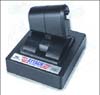 Stand-alone throttles add another device to your desk, but they make the job of engine control much easier than tapping a row of keyboard keys. Even their physical design adds to the ambiance of a flight simulation, and along with a joystick bring you closer to a “hands on throttle and stick” (HOTAS) experience. They don’t offer rudder input, but most are programmable, and you can direct a switch or pair of buttons to rudder control. Thrustmaster has a basic throttle called the Attack Throttle for $60. The high-end $160 F-16 TQS Throttle is an impressive option, and when combined with the high-end $130 F-22 joystick, looks just like the real thing. CH Products’ $95 F-16 Pro Throttle is another very good offering that worked well in our tests. For $150, Saitek sells the X36 flight system, which comes with both a stick and separate throttle unit. The X36 combination is stylishly modeled, and its quality and functionality are very good for the price.
Rudder pedals are the last item on the priority list. They’re nice, but really more important for prop and rotary-wing aircraft than jets. They also add some expense to your control suite, but they add an extra touch of realism. The CH Products’ Pro Pedals and the Thrustmaster Elite Rudder Pedals both cost about $80.
Special Considerations and Extras
 Those playing more complex simulations with confusing keystrokes may want to try out the incredible $70 Saitek PC-Dash, a programmable tablet of buttons that can simulate a control panel.
Even fancier are the force feedback devices that use motors to generate a physical response to the user. Microsoft’s $150 Sidewinder Force Feedback Pro joystick, for example, produces the resistance control surfaces would confront the pilot within aircraft lacking hydraulic systems.
All the devices I’ve reviewed here are for IBM compatible computers, so make sure your machine has a game port to make use of them. Some PCs lack built-in game ports, but may have one integrated into their sound cards. A good suggestion to follow is to combine joystick, throttle and pedal units of the same brand. Cross-brand compatibility exists, but products from the same brand tend to cooperate more easily. Apple Macintosh owners should check into the CH Products and Thrustmaster lines. Both make Universal Serial Bus versions of some of their devices that are compatible with Macs and PCs.
Where to Look
You’ll find products from CH Products, Microsoft, Thrustmaster and Saitek in most large computer stores or consumer electronics stores. You can also order direct, get more information about entire product lines and request technical support from most of these companies via their sites on the World Wide Web: CH Products: www.chproducts.com/index.html; Microsoft: www.microsoft.com/hardware/sidewinder/default.html; Thrustmaster: www.thrustmaster.com; Saitek: www.saitekusa.com/home.html.
Image 1: The Saitek Cyborg 3D Stick.
Image 2: Microsoft Sidewinder Precision Pro
Image 3: J CH Products’ F-16 Combat Stick.
Image 4: Thrustmaster’s Attack Throttle.
Image 5: Saitek’s PC-Dash control panel.

©1999, Cowles History Group, Inc. d/b/a PRIMEDIA History Group, a division of PRIMEDIA Special Interest Publications.
All rights reserved. Reproduction in whole or in part in any form or medium without express
written permission of PRIMEDIA is prohibited.